10 · CI and scheduling
Name your run recipes, shard them across machines, gate a pull request, and let the nightly regression run itself.
How a process turns a long command into a name, how sharding splits a suite across machines and merges the reports back, what a gate is, and how to run the suite on a schedule without anyone typing anything.
Time: 20 minutes · You need: chapter 9 finished.
Processes: recipes with names
Nobody should have to remember which tags, layers and browsers make up "the check we run on a pull request". A process names it once:
sdods processes list -p rwa-bank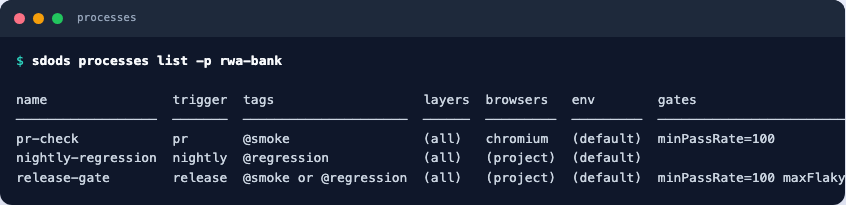
processes:
  - name: pr-check
    trigger: pr
    tags: '@smoke'
    browsers: [chromium]
    gates: { minPassRate: 100 }
  - name: release-gate
    trigger: release
    tags: '@smoke or @regression'
    gates: { minPassRate: 100, maxFlaky: 0 }
A gate is the difference between a report and a decision: a run that misses minPassRate fails the
process, whatever the individual scenarios say.
Sharding
Split the suite across machines and merge the reports afterwards:
sdods run -p rwa-bank -e local -t @regression --shard 1/3
sdods run -p rwa-bank -e local -t @regression --shard 2/3
sdods run -p rwa-bank -e local -t @regression --shard 3/3
sdods report merge .sdods/runs/<id-1> .sdods/runs/<id-2> .sdods/runs/<id-3>
report merge produces one HTML report and one JUnit file, so CI shows a single result rather than
three partial ones.
In GitHub Actions
name: tests
on: [pull_request]
jobs:
  smoke:
    runs-on: ubuntu-latest
    strategy:
      matrix: { shard: [1, 2, 3] }
    steps:
      - uses: actions/checkout@v7
      - uses: oven-sh/setup-bun@v2
      - run: bun install --frozen-lockfile
      - run: bun run sdods browsers install --with-deps -b chromium
      - run: bun run sdods run -p rwa-bank -e ci -t @smoke --shard ${{ matrix.shard }}/3
      - uses: actions/upload-artifact@v7
        if: always()
        with: { name: run-${{ matrix.shard }}, path: .sdods/runs }
Two things make this survive contact with a real repository:
- Exit codes. 0 passed, 1 a scenario failed, 2 the configuration is wrong. A 2 is your CI file's problem, not a broken test.
- HAR replay.
--har-replay --strictruns the suite with no application at all, which is how you keep a merge gate from depending on somebody's staging environment being up (chapter 6).
Starting the application in the job
-e ci above needs an application at the URLs envs/ci.yaml names. Replaying HARs is one answer;
the other is to start the application inside the job, which is how the SDODS repository runs this
very project every night. projects/rwa-bank/envs/ci.yaml points at localhost:3000 and :3001,
and a composite action brings the Real World App up before the suite runs:
runs:
  using: composite
  steps:
    - uses: actions/checkout@v7
      with:
        repository: cypress-io/cypress-realworld-app
        ref: 79aa5b126fdd951aab2263c8201b52aeb5f2a43c # pinned: upstream cannot move the suite
        path: .rwa
    - shell: bash
      run: npm install -g yarn@1.22.22
    - shell: bash
      working-directory: .rwa
      env: { CYPRESS_INSTALL_BINARY: '0', HUSKY: '0' }
      run: yarn install --frozen-lockfile && yarn db:seed:dev && yarn build:ci
    - shell: bash
      working-directory: .rwa
      run: |
        setsid nohup yarn start:ci > "$RUNNER_TEMP/rwa.log" 2>&1 < /dev/null &
# ...then wait until :3000 and :3001 both answerrwa-bank:
name: rwa-bank · chromium · @regression
if: github.event_name == 'schedule' || github.event_name == 'workflow_dispatch'
container:
image: mcr.microsoft.com/playwright:v1.64.0-noble
steps:
- uses: actions/checkout@v7
- run: npm install -g bun@1.4.3 && bun install --frozen-lockfile
- uses: ./.github/actions/start-rwa
- run: bun run sdods run -p rwa-bank -e ci -l api
- run: bun run sdods run -p rwa-bank -e ci -l ui -b chromium -t @smoke
- run: bun run sdods run -p rwa-bank -e ci -l ui -b chromium -t @regressionThree choices in it are deliberate:
- Scheduled, not on every pull request. Installing and building a full application takes minutes. A pull request keeps its fast HAR-replay gate; the live run happens nightly.
- Inside the Playwright container.
@regressionincludes the@visualsign-in baseline from chapter 7, and a baseline only matches pixels from the same fonts and browser build. Thelinux/baseline is rendered in the same image by thevisual-baselinesworkflow, which starts the app the same way. - A separate
cienv, notlocal. The URLs are the same, buthar/localholds recordings, and a scenario tagged@har:profilereplays one whenever it exists for the env. Underciit talks to the live application.
Results can flow back into the shared database and onto the pull request:
sdods report ingest --run-id <id> --server "$SDODS_SERVER_URL" --token "$SDODS_TOKEN"
sdods integrations notify --provider github --run-id <id>
sdods integrations sync --provider jira
Scheduling
The server runs processes on a cron schedule, with overlap and catch-up policies so a slow run does not pile up behind itself:
sdods schedule list
sdods schedule add -p demo-shop --name nightly --cron "0 2 * * *" --process nightly-regression --tz Europe/London
sdods serve --port 8080        # the scheduler runs inside the server
The web UI shows the same schedules, their last runs and their next fire time.
You have finished
Across ten chapters this suite went from an unknown repository to:
- a project generated by analysis and corrected by hand,
- scenarios at three layers, with page objects and healed locators,
- data, a user pool and captured login state,
- a recording converted into a reviewed proposal, and a HAR that runs offline,
- screenshot narratives and a visual baseline,
- a run database with flakiness insights,
- agents that propose changes — optionally on a model running on your own laptop,
- and processes, shards and a schedule to run all of it without you.
Point the same chapters at your own application by changing one path in chapter 1.
Where to go next
- Best practices — the habits that keep a suite alive
- Reference → CLI — every command and flag
- Known limitations — what is not built yet, in writing